Search This Blog

Saturday, 29 November 2014

Useful blog - please take the time

I came across this list of teaching blogs when looking on the internet and took a look at them. The depth of knowledge and intellect on display in them is quite awe inspiring; that teachers, who we know to be some of the busiest people can find the time to produce such polished works is amazing.

I took a look at the blogs, and was particularly taken by dontwasteyourtime
David Hopkins - a picture from his about me profile

This blog, written by David Hopkins, an e-learning consultant at Warwick University fully embraces much of what the internet has to offer in terms of social media. Mr Hopkins gives his readers a total of 20 different links to various sites that allow him to have a presence on the internet. Many of these I had not heard of before. About me, academia.edu, klout and future learn were some that were new to me.

Future learn offers free online courses and if we are so minded we can learn of many things, including the "methods & scientific underpinning of forensic science, from crime scene investigation to reporting evidential value within a case" and "how to achieve consistent and excellent results in all aspects of dental photography."

It is clear that the author is a technophile, and from navigating around his blog I have learnt much about what is available to teachers who are able to access technology and are inclined to use it. He provides his own reviews of a plethora of tools, gadgets and apps that are available. Often, these tools are not specifically for teachers, but the advantages that they confer (e.g. time-saving, organisation, engagement) are very useful for teachers.

In the short time that I've been looking at his blog I've learnt about tools I had no knowledge of, as well as more about tools I thought I understood. His style of writing is open and engaging, and it's clear that he has a passion for his subject.   

Thursday, 27 November 2014

PowerPointless?

Of late, we've been learning more about the Microsoft package Powerpoint (PP). PP is a presentation tool allowing the user to create a series of slides which can contain a host of different types of information. This information is used to augment presentations. I have only given presentations a handful of times, and I have used PP a total of once on those occasions.

In my role as a teacher, there is not much call for me to use PP, as I work one-on-one with my students. However, a good working knowledge of the software will be very useful as most of my students are expected to give PP presentations as part of their course.

When I think about what may be asked of me in the future, or what I may wish to do then I think that having a knowledge of other presentation tools will be incredibly useful. I say this because as well as being useful for my professional development as a teacher at the Met University, I also work as a job coach, advocate and mentor for people on the autistic spectrum. Part of this role involves going into work places and helping my clients' colleagues understand the effect autism can have on people. I anticipate that being able to produce effective and memorable presentations will be of great benefit to me in this role.

Over the course of the ICT module, I've been introduced to several other presentation tools. Indeed, a brief look online throws up a wide selection. One that I've been impressed with is Prezi. I like the easy way that it allows for non-linear presentations to be put together. This is useful for exploring a topic with a group of people, when the discussion is more important than information the person giving the presentation is providing.  

Wednesday, 22 October 2014

Reflective bubbl.us

Mindmapping on computers is new to me, but already I have been using it with some of my students. I find it to be an effective way of getting ideas down on paper (on screen) and being able to overcome the 'tyranny of the blank page.' The way that mind maps can develop in an organic, multi-dimensional fashion is a good aid to starting a piece of work. From these beginnings the students I have used them
with are able to then give relative importance to each part and begin to put a linear structure to their essays.
A Wordle of my first ICT assignment. We were asked to write a synopsis of a chapter from a book. I was interested to see how my synopsis looked in a wordle, so here it is...
Click on the image to see it in full screen glory!

My Wordle!

Wordle: Pedagogery
Click on the image to go through to the Wordle site...

My Crow, Soft

1991 - I would have been sweet sixteen - was around the time of my first frustrations at using a poorly designed and unnecessarily complicated  Operating System (OS); Windows had entered my life.

In the intervening years I've become familiar with a range of software created by the programming bods from Microsoft. I've also become familiar with economic terms like price fixing, monopoly and anti-trust. It seems as though having the lion's share of the bulk of the PC software market has led Microsoft into practices that, at best, lead to poor software and at worst lead them to creating substandard software as part of a business model to keep end users waiting for endless upgrades and 'new' applications.
Stella, giving her opinion on Microsoft's business practices.
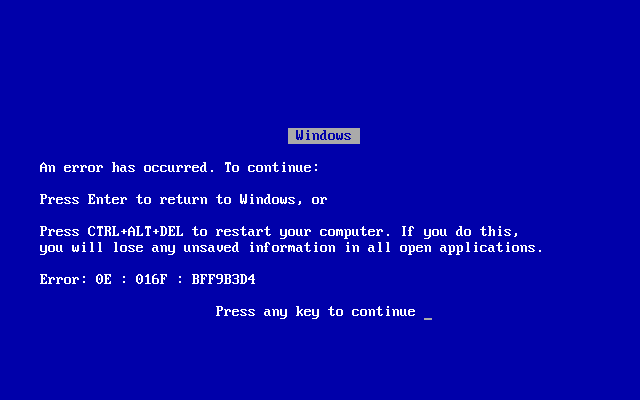
That said, I have used Microsoft's word processing and spread sheet software as a student and in my professional life, and I have found Word and Excel to be up to the task in hand. For writing essays, doing some basic (and not so basic) statistics, reviewing and changing someone else's work, producing newsletters and bringing the comic sans font to my attention Microsoft software has been good. My ire is saved for the Windows operating system. I have gazed upon the blue-screen of death too many times...
The infamous and much feared BSOD


I would advise anyone who is looking to purchase a new PC, or who wishes to get the most out of their current PC to look into using Ubuntu as their OS and to get hold of Linux shareware equivalents of the regularly used MIcrosoft software. Libreoffice is an excellent replacement for Microsoft office.

Sunday, 12 October 2014

Tekno


Charlie, during our discussion on the meaning of technology.

I have been tasked with describing the use of technology in my daily life. Immediately I heard this, my thinking went all Star Trek: blinking lights and futuristic wizardry, computers and 4G-enabled smartphones. Upon reflection I realised that this was taking my knee-jerk, narrow definition of technology as being gospel, so I quickly googled a definition of technology and found the following:

'technology - machinery and devices developed from scientific knowledge'

This pretty much supported my initial thoughts, but I thought I'd go past the first link on Google and dig a little deeper. I often find the etymology of a word to be helpful. An online etymology dictionary yielded this for technology. See also techno- and -logy from the same dictionary. I also found a teacher's guide that was particularly instructive.

This little bit of research lead me to reconsider my initial thoughts on technology and led me to a wider understanding of technology as relating to anything that has been used to make a job easier. Another way of putting it could be 'all tools are technologies of varying complexity.' Indeed, we see this when we talk about low and high-tech solutions to a problem. From the abacus to the supercomputer, smoke signals to satellite phones, technology has been part of the human experience for millennia. As an aside, there are other tool using animals. I leave it to you to decide whether these animals are using technology.

As with so many things, when scratching beneath the surface, a whole rabbit hole of intrigue and fascination can open up. Given the luxury of bucketfuls of time, I could wax lyrical about this seemingly simple brief indefinitely, but I haven't so I won't.    

So, already today I have used a smartphone, a kettle, a TV, a toaster, a bed, a staircase, clothing, a bowl, a spoon, glasses, a book, a PC, a plant pot, a watering can, a tin-opener, a remote control, a camera, a door, a door handle, a key etc. I think you get the point. By the widest definition of technology, ever since the first human (humanoid?) picked up a stone and used it to, well, to do anything, we have been using technology; further, our daily lives are inextricably linked with, and in a large part defined by, the technologies that surround us.

A smattering of technology.
Apart from the plant, making an entrance on the left,
I suggest that everything in this image is an example of technology.